HPE ProLiant DL365 Gen11 Cables and Connection Kits
Supported storage, processor, OCP, GPU, boot, battery and power cabling with configuration requirements
The HPE ProLiant DL365 Gen11 uses configuration-specific cables to connect storage backplanes, controllers, network expansion slots, boot devices and certain supporting components. A cable listed here is not automatically interchangeable with another cable: match the chassis, controller connection, drive backplane and processor configuration before ordering.
Storage cable selection depends on the installed backplane and whether an OROC, PCIe controller or direct attachment is used.
The OCP upgrade cable kits differ for one-processor and two-processor configurations.
GPU power, boot-device, DC power and battery-related cable kits have separate configuration rules.
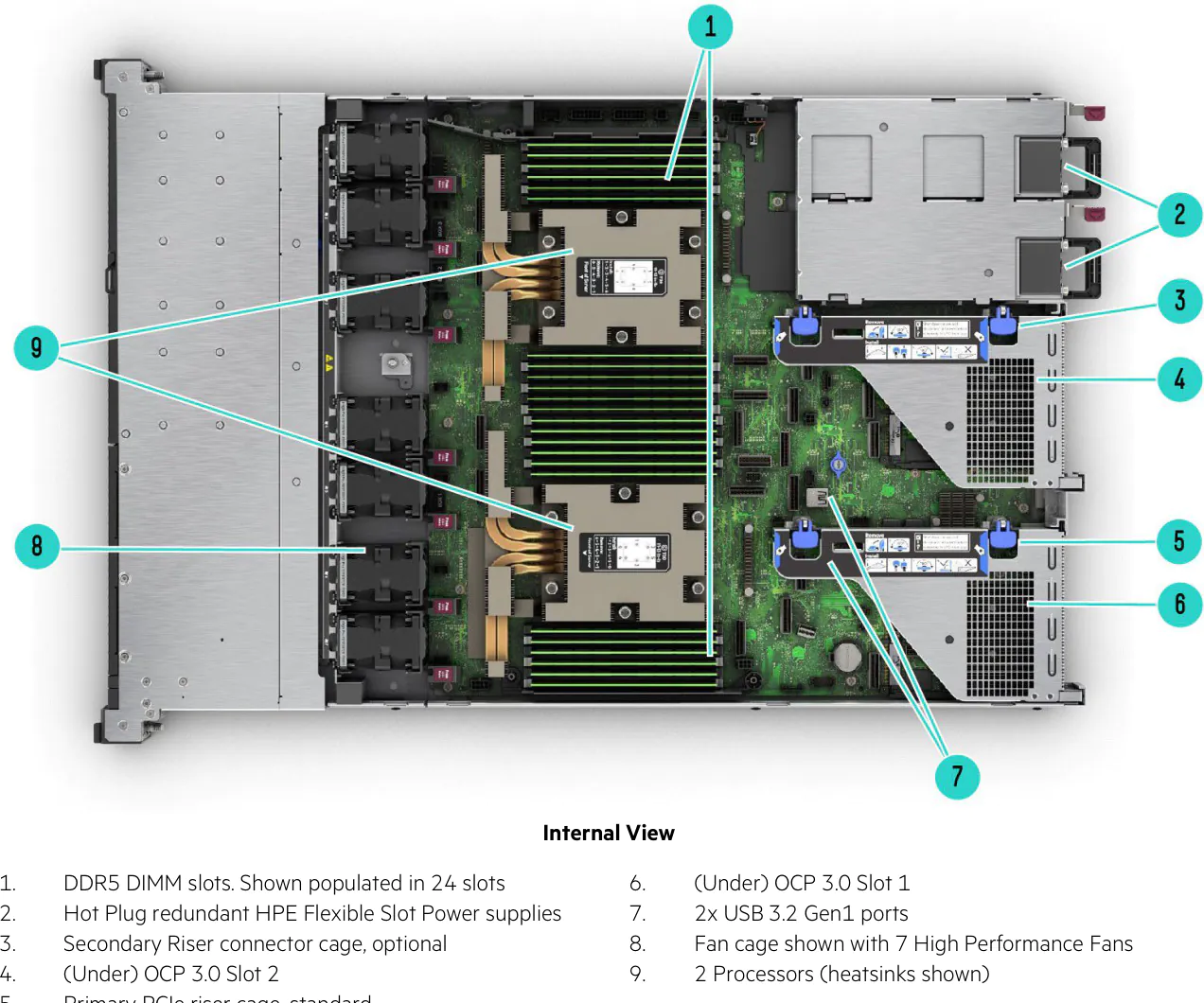
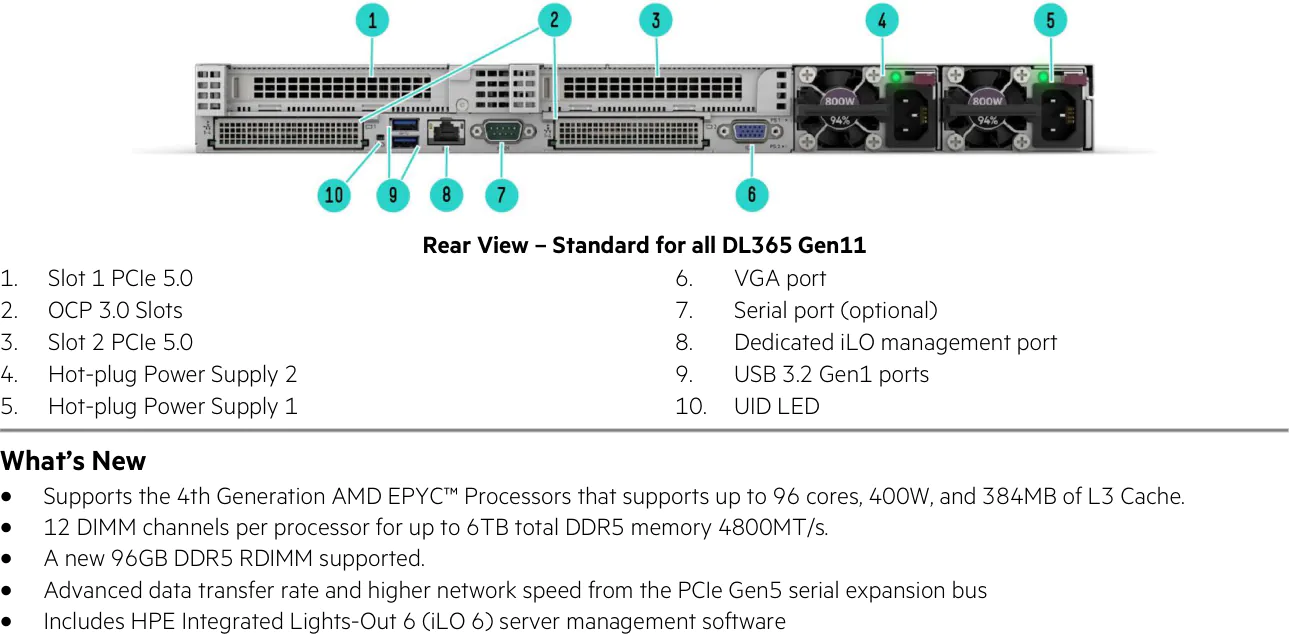
Server connector and expansion locations
The internal component layout identifies riser cages, processors, OCP positions and power-supply bays. The rear view identifies PCIe expansion positions, OCP connectors and the optional serial port. These diagrams provide physical context; they do not replace the exact kit requirements below.
Storage controller and drive backplane cable kits
These kits are used with the SFF Tri-Mode U.3 backplanes, OROC controllers, PCIe controllers or NVMe direct-attach paths. HPE lists a maximum order quantity of one per system for the first eight cable kits below. The direct-attach kits are listed separately under the same manufacturer section.
HPE DL365 Gen11 SFF Storage and NVMe Cables
| Part Number | Product Name |
|---|---|
| P56901-B21 | HPE ProLiant DL365 Gen11 8SFF OROC x1 SAS/SATA/NVMe Cable Kit |
| P56903-B21 | HPE ProLiant DL365 Gen11 8SFF x1 SAS/SATA/NVMe PCIe Cable Kit |
| P56905-B21 | HPE ProLiant DL365 Gen11 2SFF OROC x1 SAS/SATA Cable Kit |
| P56907-B21 | HPE ProLiant DL365 Gen11 2SFF x1 SAS/SATA PCIe Cable Kit |
| P56909-B21 | HPE ProLiant DL365 Gen11 2SFF SATA Direct Attach Cable Kit |
| P56911-B21 | HPE ProLiant DL365 Gen11 8SFF x4 Tri-Mode PCIe Cable Kit |
| P56913-B21 | HPE ProLiant DL365 Gen11 8SFF OROC Tri-Mode Splitter Cable Kit |
| P56917-B21 | HPE ProLiant DL365 Gen11 8SFF NVMe Direct Attach Balanced Cable Kit |
| P56918-B21 | HPE ProLiant DL365 Gen11 2SFF NVMe Direct Attach Balanced Cable Kit |
Storage cable and backplane matching
The 8SFF OROC x1 cable connects the 8SFF Tri-Mode U.3 x1 backplane to an OROC controller; its PCIe x1 counterpart supports a PCIe storage controller. The 2SFF OROC and PCIe x1 kits support the 2SFF U.3 x4 balanced backplane. The 2SFF SATA direct-attach cable is restricted to that balanced backplane. The 8SFF x4 Tri-Mode PCIe kit is used with the 8SFF U.3 x4 balanced backplane; the 8SFF OROC splitter supports an 8SFF Tri-Mode U.3 x4 backplane and OROC controller.
The two NVMe direct-attach balanced cable kits serve the respective 8SFF and 2SFF Tri-Mode backplanes. Not every backplane or controller combination allows simultaneous SAS/SATA/NVMe mixing. Choose the cable after selecting the physical backplane and storage controller.
Related storage backplanes and enablement
These items are not substitutes for the cables. They are listed to clarify the hardware referenced by the connection rules.
Backplanes and NVMe Enablement Referenced by Cable Configuration
| Part Number | Product Name |
|---|---|
| P55020-B21 | HPE ProLiant DL365 Gen11 8SFF Tri-Mode U.3 x1 BC FIO Backplane Kit |
| P55021-B21 | HPE ProLiant DL365 Gen11 8SFF Tri-Mode U.3 x4 BC FIO Backplane Kit |
| P55025-B21 | HPE ProLiant DL365 Gen11 2SFF Tri-Mode U.3 x4 BC Balanced Backplane Kit |
| P58763-B21 | HPE ProLiant DL365 Gen11 NVMe FIO Trigger Kit |
The NVMe FIO trigger kit provides support for 10 SFF NVMe direct attach and selects 8SFF x4 and 2SFF x4 drive cages; NVMe drives are selected separately. An 8SFF CTO chassis does not ship with the drive backplane already included.
Processor interconnect and OCP network upgrade cables
Processor count determines which OCP slot-upgrade cable can be configured. These are internal enablement cable kits and not external Ethernet or InfiniBand network patch cables.
Processor Interconnect and OCP Upgrade Cables
| Part Number | Product Name |
|---|---|
| P63125-B21 | HPE ProLiant DL365 Gen11 XGMI Interconnection Cable Kit |
| P57882-B21 | HPE ProLiant DL3X5 Gen11 x16 OCP1 1P Upgrade Cable Kit |
| P57849-B21 | HPE ProLiant DL3X5 Gen11 x16 OCP1 OCP2 2P Upgrade Cable Kit |
XGMI interconnection: P63125-B21 is limited to one per server, requires two processors and is supported only in the 8SFF CTO model. One-processor OCP: P57882-B21 cannot be selected when two processors are installed, and allows a maximum of one OCP card. Two-processor OCP: P57849-B21 requires two processors. Some OCP InfiniBand adapters also require an OCP upgrade cable kit.
GPU power and boot-device cables
The GPU CTO and hot-plug boot configurations use dedicated connection kits. They should not be treated as general-purpose system cables.
GPU and Boot Device Cable Kits
| Part Number | Product Name |
|---|---|
| P56919-B21 | HPE ProLiant DL365 Gen11 CPU 8-pin GPU Power Cable Kit |
| P57013-B21 | HPE ProLiant DL3X5 Gen11 NS204i-u NVMe Hot Plug Boot Device Cable Kit |
The QuickSpecs specifies one GPU power cable per supported GPU. GPU configuration also imposes chassis, riser, cooling and backplane constraints. The NS204i-u boot cable is described as required when the boot device is configured with a 4LFF rear cage; however, the same QuickSpecs states that rear drive cages are unavailable in the described CTO configuration. This is an unresolved documentation inconsistency. The NS204i-u also requires seven fans and an appropriate low-profile secondary riser when a secondary riser is configured.
Related GPU and Boot Hardware
| Part Number | Product Name |
|---|---|
| R8T26C | NVIDIA A16 64GB PCIe Non-CEC Accelerator for HPE |
| P48183-B21 | HPE NS204i-u Gen11 NVMe Hot Plug Boot Optimized Storage Device |
Storage controller battery and capacitor connection kits
HPE lists two 260mm kits and a DL3X5 Gen11 battery cable kit. The two 260mm kits must not be selected together. The QuickSpecs additionally states that the extension cable kit is required when selecting either the hybrid capacitor or the 96W smart storage battery; confirm the intended battery wiring configuration before ordering.
Storage Battery and Capacitor Cable Kits
| Part Number | Product Name |
|---|---|
| P02381-B21 | HPE Smart Storage Hybrid Capacitor with 260mm Cable Kit |
| P01367-B21 | HPE 96W Smart Storage Lithium-ion Battery with 260mm Cable Kit |
| P57884-B21 | HPE ProLiant DL3X5 Gen11 Smart Storage Battery 2P 96W Cable Kit |
Power connection cables and optional rear serial port
The -48VDC Flex Slot supply has a dedicated cable-lug option. The document also lists a standard six-foot IEC C-13/C-14 jumper cord for preconfigured models and standard AC PSU kits. Optional region- or rack-specific power cords are not individually enumerated in the supplied QuickSpecs.
Power, Serial and Security Cable Hardware
| Part Number | Product Name |
|---|---|
| P36877-B21 | HPE 1600W -48VDC Power Cable Lug Kit |
| P59431-B21 | HPE ProLiant DL36X Gen11 Rear Serial Port Cable Kit |
| P48922-B21 | HPE ProLiant DL3XX Gen11 Intrusion Cable Kit |
The -48VDC cable-lug kit must accompany the HPE 1600W Flex Slot -48VDC Hot Plug Power Supply Kit (P17023-B21). The intrusion cable is required with a Trusted Supply Chain configuration. The rear serial cable provides the optional rear serial-port path. The standard C-13/C-14 jumper cord is identified as A0K02A, but the PDF does not provide a separate formal product listing for it.
Related DC Power Supply
| Part Number | Product Name |
|---|---|
| P17023-B21 | HPE 1600W Flex Slot -48VDC Hot Plug Power Supply Kit |
Standard Included Power Jumper Cord
| Part Number | Product Name |
|---|---|
| A0K02A | 6-foot IEC C-13/C-14 jumper cord |
External network cabling and rack cable management
The networking guidance discusses active optical cables (AOC), direct-attach copper cables (DAC), and fiber-optic transceivers and cables, including thermal and adapter-selection considerations. The supplied server QuickSpecs does not give individual AOC or DAC cable SKUs, so no particular external network cable is represented as directly certified for this server by this document alone. The rack cable management arm is addressed under Rack, Rail & Cable Management rather than as an internal cable kit.
Installation and configuration checklist
- Identify the chassis: 8SFF, EDSFF or GPU CTO, before selecting internal cables.
- Confirm the exact SFF backplane and whether storage connects to an OROC controller, PCIe controller or directly to the motherboard.
- Match OCP upgrade cable selection to the number of installed processors.
- Check GPU power, fan and expansion restrictions for GPU builds.
- Confirm boot-device and battery cable dependencies, including the unresolved 4LFF rear-cage note.
- For -48VDC supplies, include the required DC cable-lug kit.
Do all DL365 Gen11 drive backplanes use the same cable kit?
No. The QuickSpecs distinguishes 8SFF and 2SFF backplanes, x1 and x4 Tri-Mode paths, OROC or PCIe controllers, and NVMe direct attachment.
Can I use the one-processor OCP upgrade cable in a dual-processor server?
No. P57882-B21 is explicitly restricted from configurations with two processors. The listed 2P alternative is P57849-B21.
When is the XGMI cable supported?
P63125-B21 is supported only with the 8SFF CTO model, requires two processors and is limited to one kit per system.
Does an NVIDIA A16 GPU require a power cable?
The QuickSpecs specifies a GPU power cable for each supported GPU; P56919-B21 is the DL365 Gen11 GPU power cable kit.
Which cable is used with the NS204i-u boot device?
P57013-B21 is the listed NS204i-u boot cable. The requirement stated for a 4LFF rear cage conflicts with the CTO rear-cage availability description and should be verified for the exact build.
Can the two 260mm storage battery cable kits be ordered together?
No. The QuickSpecs explicitly prohibits selecting both 260mm battery cable kits together.
Is a special power cable needed with the -48VDC power supply?
Yes. The QuickSpecs requires the DC power cable lug option P36877-B21 when using P17023-B21.